
Spaced Repetition App for Book Notes: How It Works
The Quotabl team · · 11 min read
You highlighted an idea in March because it seemed immediately useful. By May, you can remember the book's cover, but not the advice you wanted to try. Your highlights are still there, somewhere between your Kindle, a notes app and a photograph of a printed page.
A spaced repetition app can help you revisit those ideas deliberately. But remembering isn't the only requirement. You also need to know where each passage came from, control what returns for review and keep a readable copy if you ever switch apps.
Table of Contents
- What a Spaced Repetition App Does for Readers
- Features That Matter for Reading Notes
- Keeping Your Highlights Portable
- Choosing Which Passages Earn a Review
- How Spacing Schedules Each Review
- Common Misconceptions About Review Apps
- Start Your First Two-Minute Review Routine
What a Spaced Repetition App Does for Readers
Say the forgotten passage was about making a task easier to start. Instead of showing you the quotation immediately, a useful review prompt asks you to explain the author's suggestion from memory. You attempt an answer, reveal the passage and decide how well you understood it.
Think of the app as a card drawer with a calendar attached. It pulls out a due card, asks you to respond and assigns the next review date. A passage you recall comfortably can wait longer; something you struggle with needs another opportunity sooner.
The parts behind a review
A reading-focused review has several distinct components:
- The item is your saved highlight, accompanied by its book title, location and any personal note.
- The prompt tells you what to retrieve, such as the author's main claim, a missing term or an example.
- The schedule determines when you'll encounter that item again.
The historical pattern comes from Piotr Woźniak's SuperMemo, first released for DOS in 1987, as described in this account of early spaced-repetition software. Its lasting contribution was the feedback loop: attempt recall, assess the result and use that information to schedule another encounter.
That's different from highlighting or archiving. Those actions preserve text, but they don't necessarily ask you to produce an idea without looking.
Practical distinction: Saving a passage answers where you can find it. Reviewing it tests what you can bring to mind.
An app can estimate a useful review time; it can't know the exact moment you'll forget. What matters is whether its prompts, scheduling and library controls help you build usable recall without turning reading into an endless homework queue.
Features That Matter for Reading Notes
Test any app with a small sample of your actual reading material before committing your library. Include a purchased Kindle book, a sideloaded document if you use those and a passage with your own annotation. A polished demonstration won't tell you whether your notes survive an import.
Features to check and why they matter for reading notes
| Feature | What It Does | Why It Matters for Book Notes |
|---|---|---|
| Kindle and clipping import | Pulls highlights from the Amazon notebook and My Clippings.txt | Captures books that never reach Amazon's notebook |
| Duplicate merging | Combines repeated highlights from edited passages | Keeps the review queue free of copies |
| Note retention | Keeps your own notes attached to each highlight | Preserves the thought that made the passage worth saving |
| Adaptive scheduling | Brings kept passages back on a growing gap | Spends review time on what you're forgetting |
| Short review sessions | Shows a few highlights in about two minutes | Makes daily use realistic |
| Reminders and widgets | Surfaces passages through notifications or the home screen | Puts ideas in front of you without opening the app |
| Search and favorites | Finds passages across every book | Lets you retrieve ideas for writing or discussion |
| Markdown export | Copies the whole library with one section per book | Keeps your notes usable if you switch apps |
Test the whole path from capture to reuse
Start with import coverage. If you read on paper, look for scanning or pasted-text entry rather than judging an app only by its Kindle connection. We support page scanning, manual entry and pasted passages alongside Kindle imports.
Next, inspect an edited highlight. Does it appear repeatedly, and is your annotation still attached? Duplicate handling and note retention matter because a quotation without your original thought can become difficult to interpret.
Then try the review itself. Can you make a genuine recall attempt, choose what remains relevant and finish without working through a large backlog? A reminder should invite a manageable session, not become another notification you dismiss automatically.
Finally, search for an idea you'd use in a conversation or draft. In Quotabl, we offer full-text search across every highlight and note, favorites, personal notes and a complete Markdown export. That makes the library useful as a digital commonplace book, not just a stream of review cards.
Margo, our friendly cat reading companion, adds another route into the material. Margo can recap a book, quiz you, explore what you keep coming back to and suggest what to read next. Use a recap to recover context, then attempt a self-test without looking at the answer.
The deciding question isn't how many features an app lists. It's whether those features support the way you collect, revisit and use ideas.
Keeping Your Highlights Portable
Kindle highlights don't all live in the same place. Amazon's notebook is the online route for synced purchases. My Clippings.txt is a file on the e-reader containing highlights, notes and bookmarks created there, including material from sideloaded books and personal documents.
The Achriom Kindle export guide describes important gaps: phone-app highlights may not appear in the device file, deleted entries can remain there and some export methods require copying books individually. Treat the notebook and device file as complementary records, not interchangeable backups.
Keep an independent copy
- Copy My Clippings.txt from the Kindle's documents folder. Copy rather than move it, leaving the device's original intact.
- Save the notebook material for purchased books. This helps preserve highlights made through a different reading route.
- Keep both records in a folder you control. Use filenames that identify the source and backup date.
- Export your app library to Markdown regularly. Open the result in a separate text editor to confirm it's readable.
- Test duplicates and deletions. Import an edited passage and check whether an old version returns or your annotation disappears.
Our Kindle highlight export guide helps you choose an import route. Quotabl imports My Clippings.txt from any Kindle e-reader, merges duplicate highlights and retains notes. From the You tab, you can export the whole library as Markdown, organized by book, and share it to another app.
A backup is useful only if you can open it without the service that created it.
If you're comparing reading services, Comredix's review, is Readwise Reader worth it, can inform your shortlist. Apply the same portability test to every option: inspect what comes out, not just what goes in.
Choosing Which Passages Earn a Review
Suppose you import a large collection and immediately feel behind. The problem may not be your discipline. You may have put an archive of interesting passages into a queue intended for deliberate practice.
Not everything worth saving is worth rehearsing. Keep the archive generous if you like, but make the active review set selective.
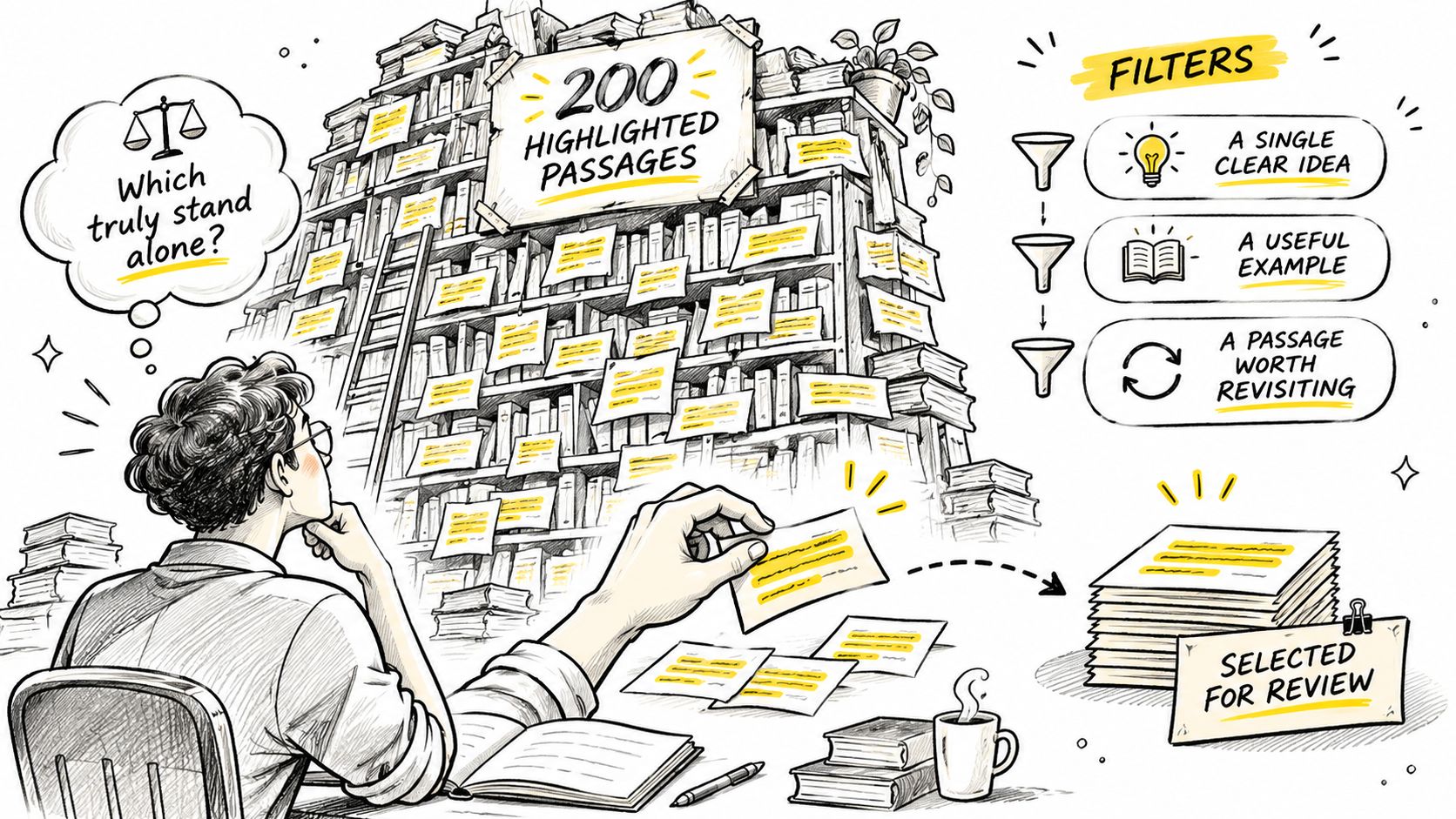
Use filters before adding more reviews
- Keep an idea that can stand alone. A passage about reducing friction might be understandable without its chapter. A sentence beginning with an unexplained reference to an earlier example probably isn't. Add a brief note identifying the example, or leave the passage out of review.
- Separate memorable language from actionable principles. You might save a beautiful description because you enjoy its wording. That doesn't mean you need to memorize it. A principle about preparing your workspace, by contrast, may deserve a prompt that asks you to explain how you'd apply it.
- Attach an application question. For a passage about listening, ask yourself what you could do differently during your next difficult conversation. Your answer should name a situation and an action, not merely repeat that listening matters.
Consider a highlight about making tasks easier to begin. A weak prompt asks whether the passage sounds familiar. A stronger prompt asks what you could prepare before starting an awkward task, then invites you to compare your answer with the author's advice.
Merge ideas, not just identical text
Different authors may describe the same underlying principle. You don't need to rehearse every version unless their differences matter. Keep the clearest explanation as your main review item and preserve the other passages for comparison or writing.
Defer uncertain passages instead of making every decision permanent. A quotation may matter again when your work, interests or circumstances change. Removing it from active review needn't mean erasing it from your library.
If you repeatedly retire a passage, accept that signal. Perhaps it was worth noticing while reading but isn't something you need to carry into everyday life.
How Spacing Schedules Each Review
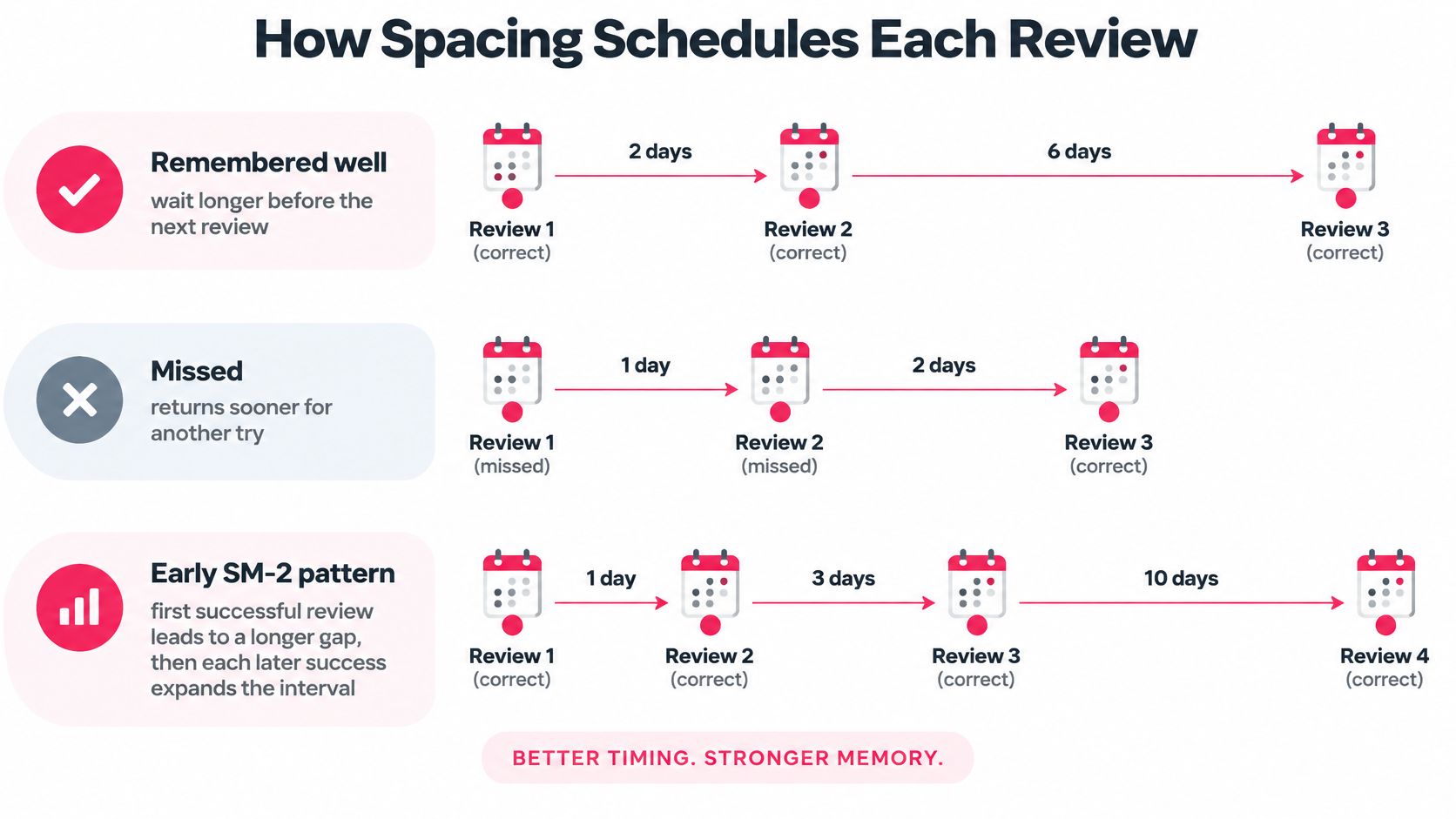
A scheduler changes the gap between encounters instead of showing every passage on the same repeating calendar. In the early SM-2 pattern, initial successful reviews used short preset gaps, followed by intervals expanded using an item-specific factor. The important idea is adjustment for the individual item, not a universal timetable for an entire book.
Think of packing for a trip. You don't need to keep checking an item you've confidently packed, but an unresolved item deserves another look. Similarly, a scheduler should distinguish a passage you can explain easily from one whose meaning you still confuse.
Match the gap to the memory goal
Carnegie Mellon University's teaching center reports that undergraduates who reviewed meteorology material 8 days after a lecture performed 7 percentage points better on a test a month later than those who reviewed after 1 day, and describes a review-gap guideline of approximately 10% to 20% of the intended retention period.
That's evidence for spacing educational material, not a guarantee about remembering every quotation. It also doesn't mean that stretching a gap indefinitely will help. You still need enough understanding to make a meaningful retrieval attempt.
The following table calculates that guideline for illustrative memory goals. These are calculations, not app defaults, and the weekly examples are rounded.
Review gaps by how long you want to remember
| Target Memory Period | Recommended Gap | Example Review Spacing |
|---|---|---|
| 1 month, about 30 days | 3 to 6 days | Review every 3 to 6 days |
| 10 weeks, 70 days | 7 to 14 days | Review every 1 to 2 weeks |
| 6 months, about 180 days | 18 to 36 days | Review every 3 to 5 weeks |
| 1 year, 365 days | 36.5 to 73 days | Review every 5 to 10 weeks |
For a near-term discussion, the shorter target suggests returning within days. For a course assessment farther away, weekly encounters may fit better. For a principle you want to retain over a longer horizon, the illustrative gaps extend into weeks, but they aren't a reason to postpone a passage you haven't understood.
Distinguish recall from relevance
Exam-style facts and reflective book notes need different handling. You may need accurate retrieval of a definition, while a leadership principle might call for a paraphrase and a practical example. Choose a schedule that serves that purpose, and check whether you can change or defer reviews.
Our Daily Review uses your choices to manage circulation: kept highlights return on a growing schedule, while highlights you don't keep appear less often. That relevance signal shouldn't be confused with a formal correct-or-incorrect recall grade.
The forgetting-curve tool offers a visual way to think about delayed review. Use the picture to understand the mechanism, not to predict an exact deadline for your memory.
Common Misconceptions About Review Apps
More repetition is always better. Only if the repetition serves a purpose. Repeatedly displaying an irrelevant passage can make you tired of notifications without helping you explain or use the idea.
A useful test is to close the passage and describe its meaning. If you can recognize the wording but can't supply an example, the next step may be a better question or restored context, not another identical exposure.
Familiar wording isn't the same as an idea you can explain or act on.
Forgetting isn't a verdict
Forgetting means you've failed. In a recall-based system, a missed answer provides information about what needs attention. It can also reveal a poorly written prompt, an overly long passage or a concept you never fully understood.
Don't automatically treat every lapse as a scheduling problem. If a question asks for an entire chapter's argument, divide it into manageable ideas. If you can't remember who the author was discussing, attach the missing context before trying again.
A vendor's retention score proves lasting change. A retention measure tells you something about the tested task under the reported conditions. It doesn't establish that readers will use a negotiation principle successfully or change a persistent habit.
The vendor-authored Edirae guide to spaced repetition is useful context for evaluating review claims, but its reported retention comparisons shouldn't be treated as independent proof of behavioral improvement. A book-note routine needs a practical test as well: can you identify an appropriate situation and try the idea there?
Prefer controls you can understand
Look for a system that lets you judge relevance, difficulty and usefulness separately. A passage can be difficult but unimportant, or easy to remember yet worth revisiting before a specific conversation.
You should also be able to understand why something returns. An unexplained queue is harder to maintain than a library where you can keep, defer or retire passages deliberately.
Start Your First Two-Minute Review Routine
Start this week with a two-minute daily review, not a plan to master your entire reading history. Prepare a small, relevant set so you can spend your attention answering rather than organizing.
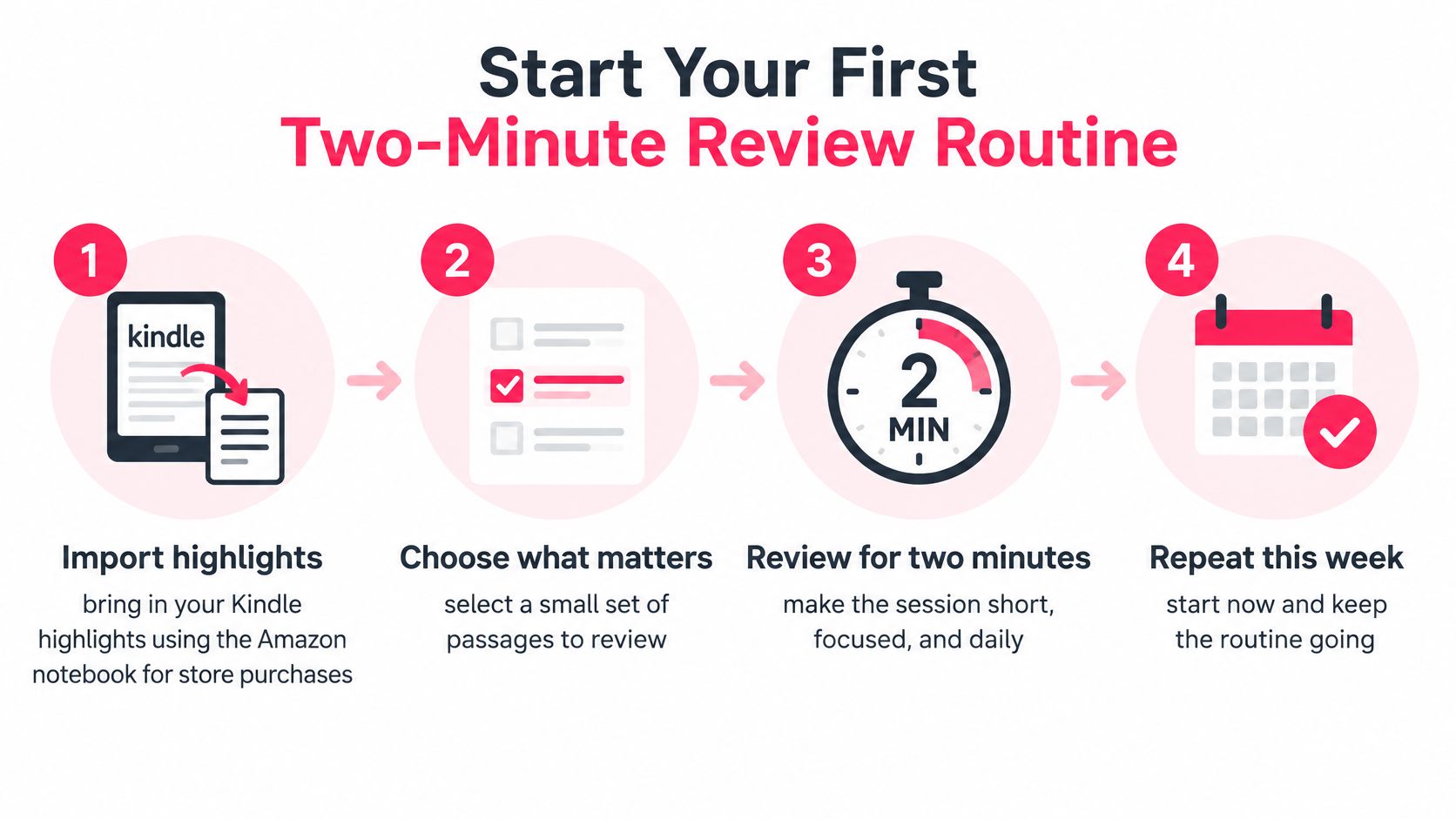
Set up a routine you can repeat
- Import your highlights. Use the Amazon notebook for synced purchases and My Clippings.txt for device-created material, including sideloaded books.
- Prepare the review set. Merge duplicates, select passages that make sense independently and add an application question to each.
- Choose a reminder. Set a notification for a time you select, or use an iPhone home-screen widget if that suits your routine.
- Answer before checking. Spend the short session attempting recall, then inspect the passage. Keep what you want in circulation and let less relevant material appear less often.
- Maintain a separate backup. Choose a recurring monthly export habit and open the Markdown copy to check that your notes remain readable.
Quotabl's Daily Review presents a few highlights at a time and takes two minutes. Kindle sync, reviews, reminders and Margo's recaps and quizzes work on iPhone and Android; Home Screen and Lock Screen widgets are iPhone-only. You choose the notification time and frequency.
Keep the habit small: After a missed day, resume with a manageable session rather than assigning yourself a catch-up marathon.
The app handles delivery, but you supply the attempt to remember. A missed session isn't a reason to restart your library or abandon the routine. Return to the next useful passage and continue.
Quotabl brings Kindle highlights and personal notes into a searchable library, resurfaces selected passages for daily review and lets you export the whole collection as Markdown. Visit Quotabl to start a short review routine that keeps both your ideas and your notes within reach.

Written by
The Quotabl team
Makers of Quotabl
We make Quotabl, the app that syncs your Kindle highlights and brings them back with a daily review, a Home Screen widget and Margo, a reading companion. We write about reading, remembering what you read, and getting more out of your highlights.